Windows 10 End of Support: Why We Recommend Windows 11 Now
Windows 10 end of support happened on October 14, 2025. If you’re one of the many people in Victoria still using a Windows 10 computer, our advice is simple: upgrade to Windows 11 now rather than waiting. If your computer can run it, the upgrade is free. If it can’t, now is the time to plan a replacement, calmly and on your own schedule.
You may have read that Microsoft extended free Windows 10 security updates to October 2027. That’s true, but as we explain below, we see it as a stopgap, not a plan.
What “end of support” means for your computer
Your Windows 10 computer didn’t stop working when support ended, and it won’t suddenly stop working now. What ended was the regular stream of free security updates: the behind-the-scenes fixes that close the holes scammers and viruses use to get in. Microsoft also stopped adding features and stopped providing technical support for Windows 10.
Over time, other software follows. Web browsers, banking apps, printers and antivirus programs gradually stop supporting older systems. A computer that’s fine today becomes harder to keep safe and working every month.
Why we don’t recommend sitting on the extension
Microsoft offers home users a program called Extended Security Updates (ESU), which keeps sending security fixes to enrolled Windows 10 computers. In June 2026, Microsoft updated its Windows 10 ESU page to extend it to October 12, 2027.
It sounds like a free year, but here’s why we generally tell our Greater Victoria customers to move to Windows 11 instead:
- It only delays the same decision. In October 2027 you’ll face exactly the same choice, with a computer that’s another year older.
- It’s security fixes only. No new features, no improvements, and no technical support from Microsoft.
- Software support keeps shrinking. ESU doesn’t stop other companies from dropping Windows 10 support for their apps and devices.
- Upgrading is easier when you’re not rushed. Waiting until the last minute means making decisions under pressure, often when everyone else is too.
If your computer can run Windows 11, there’s very little reason to wait. The upgrade is free and keeps your files and programs.
Can your computer run Windows 11?
Windows 11 needs more modern hardware than Windows 10. According to Microsoft’s Windows 11 requirements, your computer needs at least:
- A compatible 64-bit processor (1 GHz or faster, with 2 or more cores)
- 4 GB of memory (RAM)
- 64 GB of storage
- TPM 2.0, a security chip built into most computers from the last several years
- UEFI firmware with Secure Boot capability
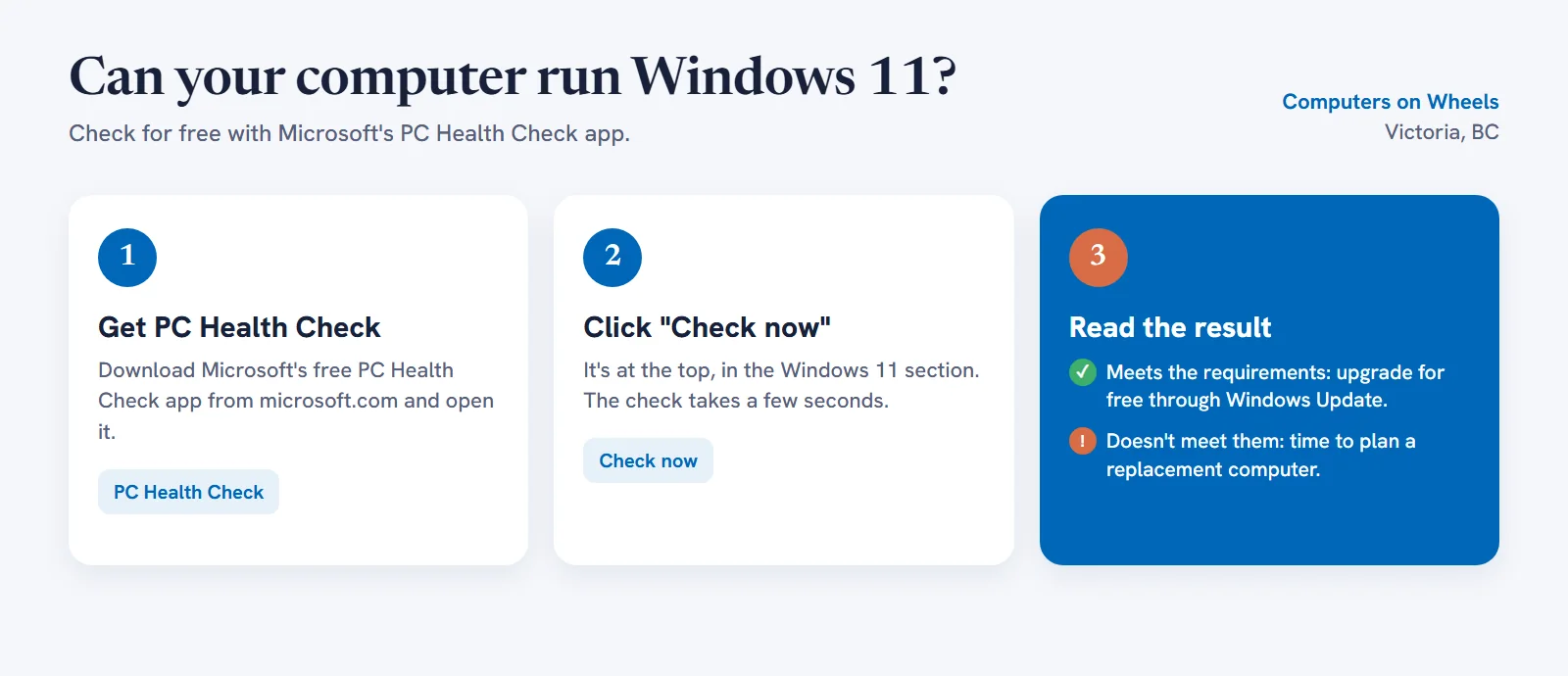
You don’t need to look any of that up yourself. Microsoft’s free PC Health Check app checks everything for you and tells you why if a computer doesn’t qualify.
How to upgrade to Windows 11 for free
If PC Health Check says your computer is ready, here’s how to upgrade:
- Back up first. Copy your photos, documents and anything important to an external drive or cloud storage. Upgrades usually go smoothly, but a backup means nothing can be lost.
- Click Start, open Settings, then go to Update & Security and Windows Update.
- Click Check for updates. If your computer is eligible, you’ll see an offer to upgrade to Windows 11.
- Choose Download and install, and leave the computer plugged in. The upgrade can take an hour or more and restarts several times.
The free upgrade keeps your files, programs and settings, and gives you the same edition you have now (Windows 10 Home becomes Windows 11 Home). If the offer doesn’t appear but PC Health Check says you qualify, Microsoft also offers the Windows 11 Installation Assistant on its Get Windows 11 page.
A word of caution: Microsoft will never phone you, email you, or show a pop-up with a phone number about upgrading or “renewing” Windows. The upgrade only happens through Windows Update or Microsoft’s own website. If anyone contacts you about Windows 10 support and asks for payment or remote access to your computer, it’s a scam. Hang up.
What if your computer can’t run Windows 11?
Many computers more than about six or seven years old don’t meet the requirements, usually because of the processor or the TPM security chip. In that case, we recommend replacing the computer rather than keeping it on Windows 10. A few tips:
- You may not need anything fancy. For email, browsing, video calls and photos, a modest new computer is plenty. Buy for what you actually do, not for the biggest specs in the store.
- Plan the move, don’t rush it. The hard part isn’t buying the computer. It’s moving your photos, documents, email, passwords and printer across without losing anything.
- Only as a last resort: if you genuinely can’t replace a computer right away, enrolling it in ESU (in Settings → Update & Security → Windows Update, look for Enroll now) keeps security fixes coming until October 12, 2027. Treat it as a short bridge, not a reason to put the decision off.
For small businesses around Victoria
The free ESU program is for personal computers only. Business computers joined to a company network aren’t eligible, and Microsoft’s paid business ESU gets more expensive each year it’s used. For offices, clinics and shops around Victoria and Saanich, moving every machine to Windows 11 is the practical choice: upgrade the ones that qualify and replace the rest, oldest first. Our small business IT support can plan and handle the whole rollout.
Retiring an old computer in Victoria? Recycle it for free
If you’re replacing a Windows 10 computer, please don’t put it in the garbage. Computers contain materials that shouldn’t go to landfill, and the hard drive may still hold personal information.
- Back up and wipe it first. Copy your files off, then securely erase the drive. If you’re not sure how, we can transfer everything to your new computer and wipe the old one for you.
- Drop it off for free. BC’s Return-It Electronics program accepts desktop and laptop computers, monitors and accessories at no charge. In Victoria, collection sites include Staples on Tolmie Avenue and Best Buy at Uptown. Call ahead to check hours, or use Return-It’s online location finder for other sites across Greater Victoria.
When to call a professional
Many people can run PC Health Check and the upgrade on their own. It’s worth getting help if:
- PC Health Check says your computer doesn’t qualify and you’d like an honest second opinion.
- The Windows 11 upgrade fails, gets stuck, or shows errors.
- You’re buying a new computer and want help choosing one that fits what you actually do.
- You want everything moved to a new computer (photos, documents, email, passwords and printer) without losing anything.
- You run a small business with several Windows 10 computers to move over.
We come to homes and offices across Greater Victoria to handle Windows 11 upgrades, new computer setups and data transfers, and we’ll always tell you honestly whether an upgrade or a replacement makes more sense. You can see all our services or book a visit.
The short version
- Windows 10 support ended on October 14, 2025.
- Free extended security updates run to October 12, 2027, but they’re a stopgap, not a plan.
- If your computer can run Windows 11, upgrade now. It’s free and keeps your files.
- If it can’t, plan a replacement and recycle the old one for free through Return-It.
- Microsoft will never call you about Windows. Anyone who does is a scammer.